Introduction to Power Apps Code Apps: Building Enterprise Applications with a Code-First Approach
Publicado el June 08, 2026 por Admin
What Are Power Apps Code Apps?
Power Apps Code Apps refer to applications developed using a code-centric approach rather than relying exclusively on drag-and-drop designers. This model is particularly useful for:
- Enterprise-grade applications
- Complex business logic
- Advanced integrations
- Custom user interfaces
- Scalable application architectures
- DevOps and CI/CD implementations
The approach enables developers to leverage:
- Visual Studio Code
- GitHub
- Azure DevOps
- Power Platform CLI
- Dataverse
- Custom APIs
- PCF (Power Apps Component Framework)
Minimum Requirements
Before developing Code Apps, ensure the following prerequisites are available.
Licensing
- Microsoft 365 License
- Power Apps Premium License (recommended)
- Power Platform Environment
Development Tools
Visual Studio Code
Required for professional development activities.
Key extensions:
- Power Platform Tools
- GitHub Copilot (optional)
- Azure Tools Extension Pack
Power Platform CLI
Power Platform CLI enables developers to:
- Create projects
- Manage environments
- Export solutions
- Automate deployments
Example:
pac auth create
Installation
Step 1: Install Visual Studio Code
Download and install Visual Studio Code.
Recommended extensions:
- Power Platform Tools
- Azure Account
- GitHub Pull Requests
Step 2: Install Power Platform CLI
Install Power Platform CLI and verify installation:
pac --version
Step 3: Authenticate
Connect to your Power Platform environment:
pac auth create
Select:
- Environment
- Tenant
- Authentication Method
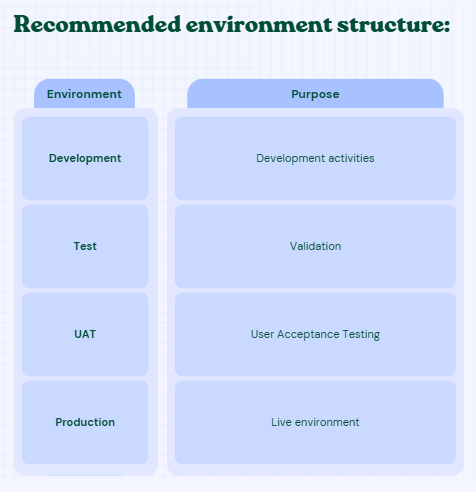
Creating a Development Environment
A dedicated development environment should include:
- Dataverse
- Solutions
- Security Roles
- Environment Variables
Connecting to Dataverse
Dataverse is Microsoft's enterprise data platform.
Example tables:
- Employees
- Projects
- Requests
- Customers
Benefits:
- Enterprise security
- Auditing
- Relationships
- Scalability
- Business rules
Califica este artículo
Comentarios (0)
Deja un Comentario
Aún no hay comentarios. ¡Sé el primero en comentar!